Your drawing back,
marked up in 60 seconds.
Upload an engineering drawing and Kunstruct checks it against ASME Y14.5 conventions, manufacturability practice, and your company's own drafting standards. Findings come back marked on the drawing itself, each with the reasoning behind it and the fix.
Free while in beta · no review limit · no install · no credit card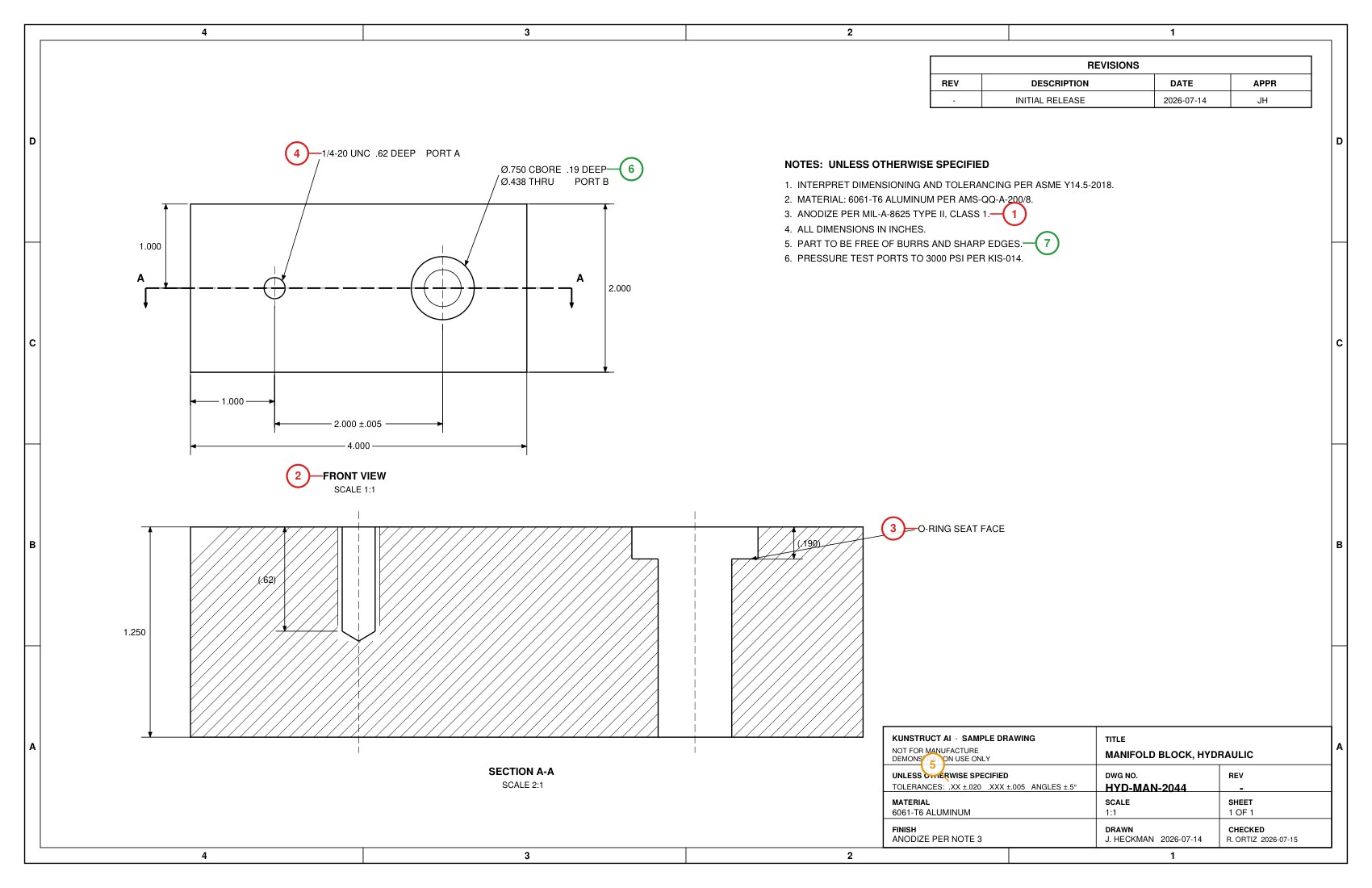 Real output from the built-in sample drawing. Run it yourself, no upload required.
A redlined drawing, not a wall of text.
Every finding is anchored to the callout it relates to, located through the drawing's own text layer. Markers are numbered and coloured by severity, and the same numbers appear in the findings list, so you can move between the sheet and the reasoning without hunting.
If a finding cannot be located confidently, it is reported as unplaced rather than dropped somewhere approximate. A marker pointing at the wrong feature is worse than no marker.
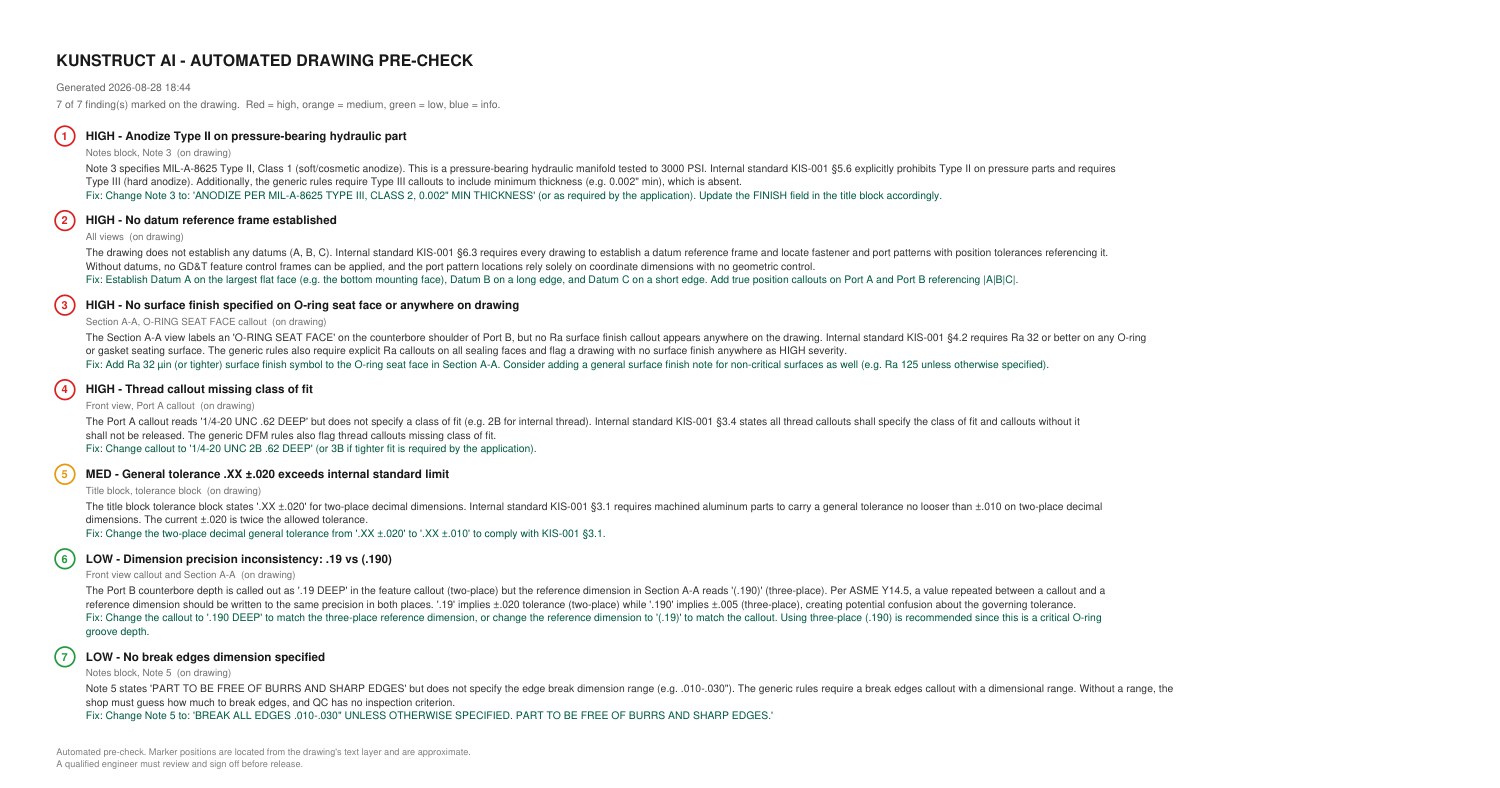 An index page is appended to the redlined PDF, so the marked-up sheet stands on its own when you hand it to a drafter.
The review a senior engineer runs, every time.
Not a spell check on your notes block. These are the findings that send a drawing back from the shop floor or the supplier.
It tells you why, not just what.
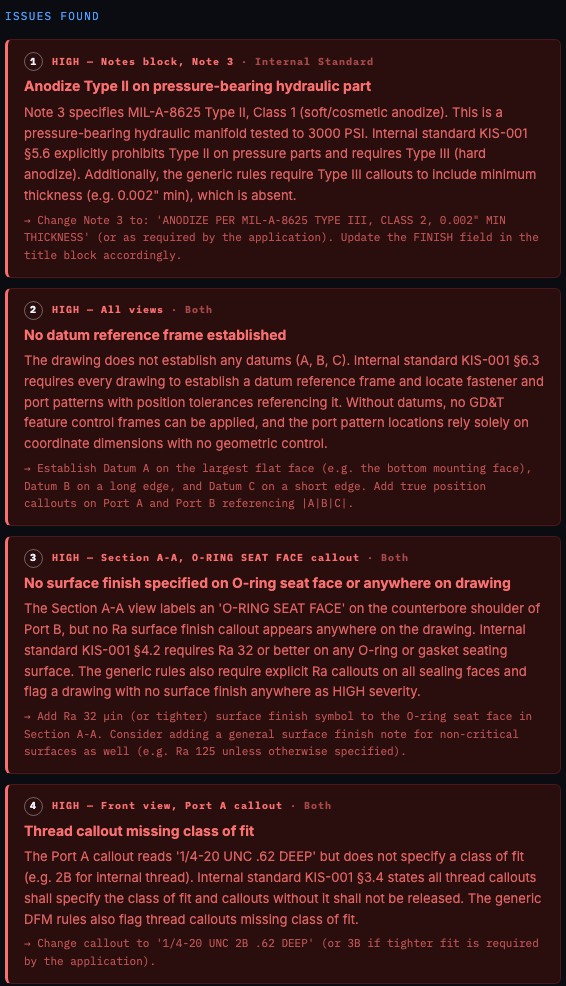
Each finding carries its severity, where it is on the drawing, what the consequence is, and the specific change to make. That is the difference between a flag you ignore and a redline you act on.
Findings also say where they came from: ASME and general drafting practice, your own uploaded standard, or both. So when the tool tells you a tolerance is too loose, you can see that it is your own spec talking.
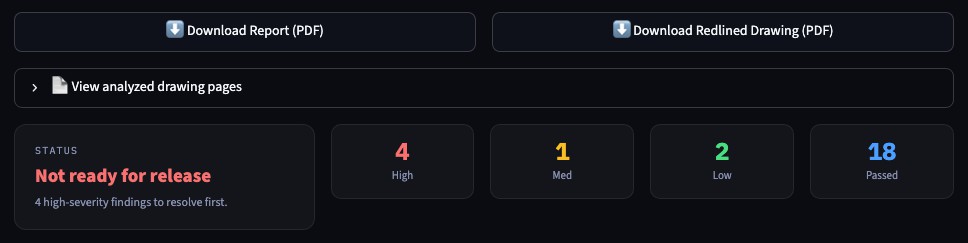
You get a release call rather than a score out of a hundred, because what matters is whether anything blocks release, and which finding it is.
Checked against how your company works.
Your internal standards
Upload your drafting standards and Kunstruct checks against those too, so a general tolerance that is fine industry-wide but violates your internal spec gets caught. It also tells you which referenced specs it could verify and which it could not, instead of quietly assuming.
Your drafting checklist
Most teams have a checklist they fill out per drawing, separate from the standards document. Upload yours as PDF, Excel, or Word and it comes back filled out: what passed, what failed, and what still needs a human, with evidence for each call.
Anything it cannot verify from the drawing alone is marked needs review rather than guessed, so you know exactly where a qualified engineer still has to look. Download it back as Excel or PDF for the release package.
Your released drawings
A standard tells you what ASME requires. It does not tell you that your company writes a dash revision on an initial release, or how your drafters handle a depth that already appears in the hole callout. That knowledge does not live in any document. It lives in the drawings you have already released.
Kunstruct is being built to read your released drawing history in PDM and learn those conventions directly, so a new drawing gets reviewed the way your own checker would review it, not the way a generic rule set would.
Today the tool checks against ASME Y14.5, general drafting practice, and any standards or checklists you upload. Learning from your PDM history is in development and is not part of the live tool. Until it exists, findings where companies legitimately differ are marked as convention rather than reported as defects.
Free while we get it right.
Kunstruct is in beta. The Drawing Review tool is free, there is no review limit, and there is no card. There is nothing to subscribe to yet, and that is deliberate: what this stage needs is engineers running real drawings through it and telling us where it falls down.
Every review ends with a feedback form. A rating, a comment box, and an optional tick box to share the drawing so we can debug your feedback against it. It comes to us directly.
Telling us a finding is wrong is more useful right now than telling us one was right.
Run a drawing and tell usWhat is most useful to hear
- A finding that is wrong, and why it is wrong
- Something it should have caught and missed
- A convention it called a defect when it is just how your company draws
- A marker in the redline that landed on the wrong feature
The third one matters most. No standards document can tell us your house style, so until Kunstruct can read it from your released drawings, an engineer telling us is the only way it gets there.
Three steps, about a minute.
Before you upload anything.
Before you try it.
What does it cost?
Nothing right now. Kunstruct is in beta, the Drawing Review tool is free, and there is no review limit and no card. There is no subscription to buy yet, and that is deliberate: what we need at this stage is engineers running real drawings through it. When that changes we will say so clearly, well before anything is charged for.
What file types can I upload?
Engineering drawings as PDF, including multi-sheet drawings. All sheets get reviewed. For drawing packages you can upload an assembly drawing plus its detail drawings together.
Can it check against our company's own drafting standards?
Yes. Upload your internal standards documents and Kunstruct checks the drawing against those in addition to ASME Y14.5 conventions and general drafting practice. You can save them so you do not have to upload them again.
Does it learn our company's drawing conventions?
Not today. It checks against ASME Y14.5, general drafting practice, and any standards or checklists you upload. Learning your conventions from your released drawing history in PDM, the preferences no standards document captures, is in development and is not part of the live tool.
We use a drafting checklist. Can it fill that out?
Yes. Upload the checklist your team fills out per drawing, as PDF, Excel, or Word, and you get it back completed: what passed, what failed, and what still needs a human, with the evidence behind each call. Items it cannot verify from the drawing alone are marked for review rather than guessed.
Do I get a score out of a hundred?
No, and that is on purpose. A number invites an argument about the rubric instead of action on the findings, and two drawings scoring the same can need completely different work. You get a release call, whether anything blocks release and which finding it is, plus counts by severity.
How does it decide where to put the markers?
Each finding is anchored to the exact text it relates to, located through the drawing's text layer, with the border zone as a fallback. If neither resolves, the finding is listed on the index page and reported as not located, rather than dropped somewhere approximate. Scanned drawings with no text layer still get the full findings list, without markers.
How do I tell you it got something wrong?
Every review ends with a feedback form: a rating, a comment box, and an optional tick box to share the drawing so we can debug your feedback against it. It goes straight to us. Telling us a finding is wrong is more useful to us right now than telling us one was right.
Is my drawing used to train AI models?
No. Files are processed for your review session and are not used to train models. Drawings are not stored on our servers unless you explicitly choose to share one when leaving feedback. See our privacy policy for the full detail.
Can I use this on ITAR or export-controlled drawings?
No. The public tool processes files through a commercial cloud AI service and is not an authorized environment for controlled technical data. Use non-controlled drawings only. If you need controlled-data handling, ask us about on-premises deployment.
How accurate is it?
It is a pre-check, not a replacement for your reviewer. It is built to catch the routine, repetitive problems that consume senior engineering time, and every finding comes with the reasoning so you can judge it yourself. It is also in beta and it does get things wrong, which is exactly what we want to hear about. A qualified engineer still signs off.
Run one drawing through it.
It is free while we are in beta. If it catches something on a drawing you already released, that is the whole pitch. If it gets something wrong, tell us, and that is just as useful.

Less time quoting. More time making parts. An AI quoting loop that runs in the CAD, inbox and Teams your shop already uses.
© 2026 Kunstruct AI Inc. All rights reserved.Autodesk Fusion, Microsoft Teams, Microsoft Outlook, OneDrive and all other product names mentioned on this site are trademarks of their respective owners. Kunstruct AI is an independent company and is not affiliated with, endorsed by, or sponsored by any of them. The recordings and screens on this site show Kunstruct running on KAI sample parts for a fictional customer, priced with example shop rates, in a pilot environment.