Less time quoting. More time making parts.
Kunstruct picks the request up wherever it arrives, builds the model from the drawing, checks manufacturability, plans the job on your machines and tooling, and prices every quantity. When something needs a person, it takes the question to whoever owns the answer, wherever they already talk, and nothing goes to the customer until it has been signed off.
Runs in Autodesk Fusion with the inbox, chat and drive your shop already uses · Other CAD platforms in developmentIt runs on the systems your team already has.
The panel lives in Autodesk Fusion. The RFQ comes out of the inbox you already watch. The questions arrive in the chat your people already use. The quote folder is on your drive. Nobody learns a new system.
 Autodesk FusionDesign, CAM
 OutlookRFQ intake, quotes out
 GmailRFQ intake, quotes out
 Microsoft TeamsQuestions, sign-off
 OneDriveQuote folders
 ExcelForecasts, capacity
 WordQuote documents
- PDFPDFDrawings, RFQs, quotes
- STPSTEPCustomer models
 SOLIDWORKSAdd-in in progress
- Inventor
- PTCCreo
 Siemens NX
- CAMGibbsCAMToolpaths
- CAMMastercamToolpaths
- ERPJobBOSSQuote in, router out
- ERPProShopQuote in, router out
- ERPEpicor, E2
 SAPERP
- PDMVault, PDM
 Slack
Slack Google Drive
 Google Sheets
- SPSharePoint
 Dropbox
Your shop, your numbers. Machines, tooling, material prices, rates and margins come from your shop profile, so two shops quoting the same part get different prices, because they should. Nothing is pooled across shops and your files are never used to train models.
Product names and logos belong to their owners and indicate compatibility, not endorsement. The demos on this page were built in Autodesk Fusion with Outlook, Teams and OneDrive.Your IP stays yours.
Your tenant, your drive, your CAD
The panel runs inside Autodesk Fusion on your workstation. The quote folder is on your OneDrive. The Teams bot is installed in your own Microsoft 365 tenant by your admin, who can remove it at any time.
Your data is never training data
Files are processed for your quote and nothing else. No training on customer data, no pooling across shops, and your own history stays in your environment.
Built for controlled work
For export-controlled programs the pipeline keeps drawings on the workstation and the inference endpoint is pluggable, so a US-hosted government cloud can be used when the work requires it.
One quote request, in to out, in four steps.
Kunstruct does the reading, modeling, planning and pricing, about ten minutes of its own time on the run shown here. Your people make the calls that need a person, and nothing goes to the customer until they sign off.
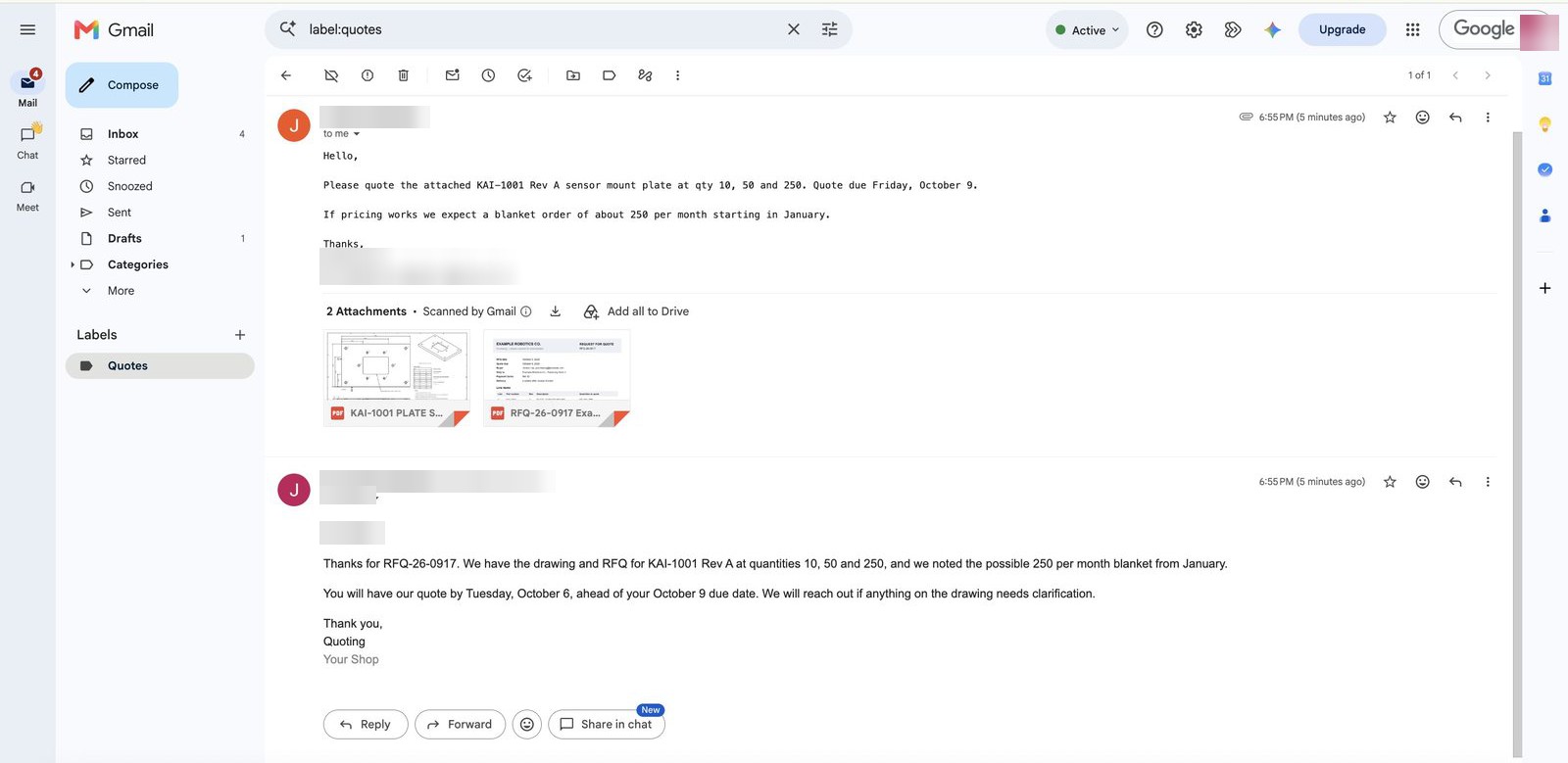
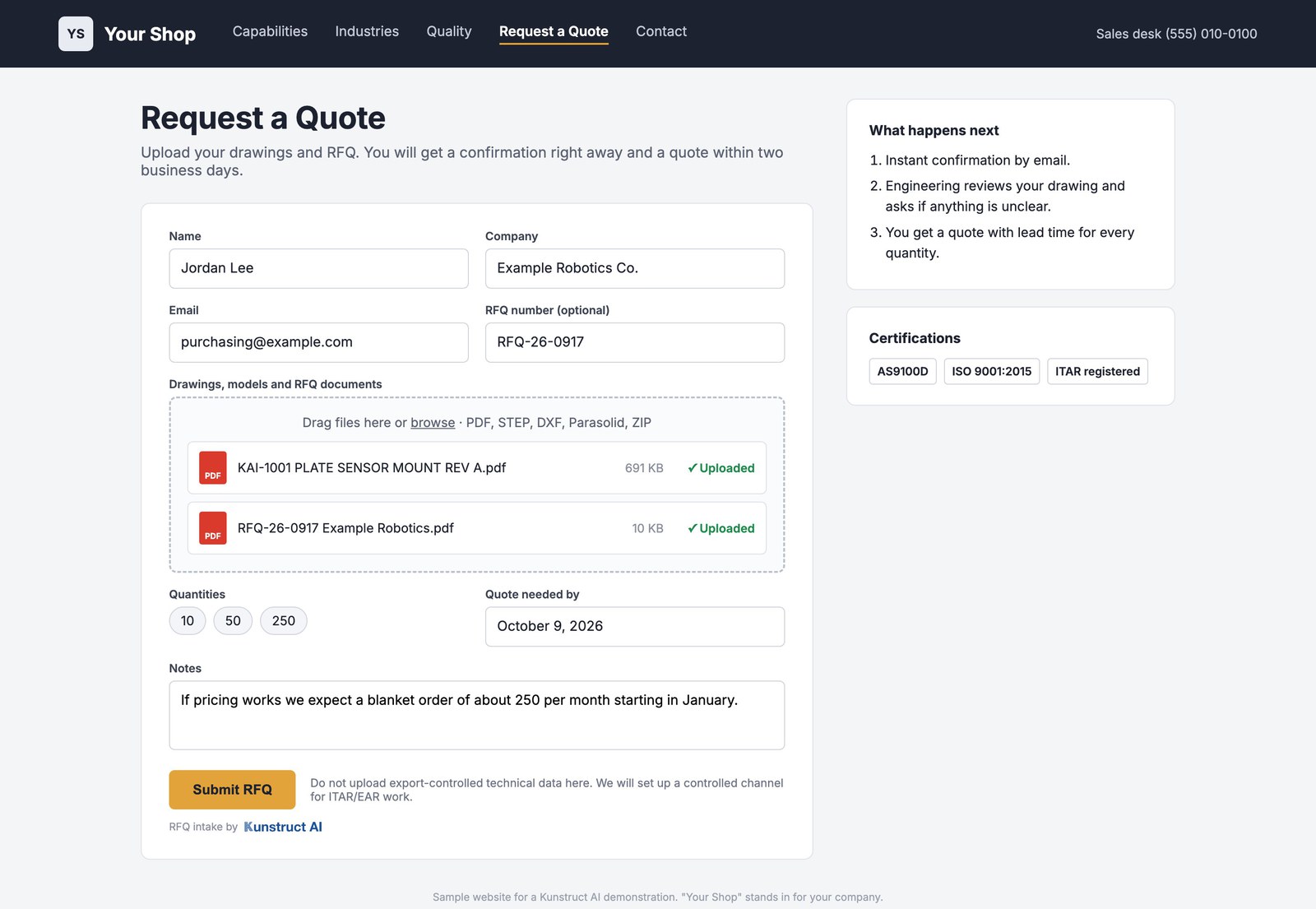
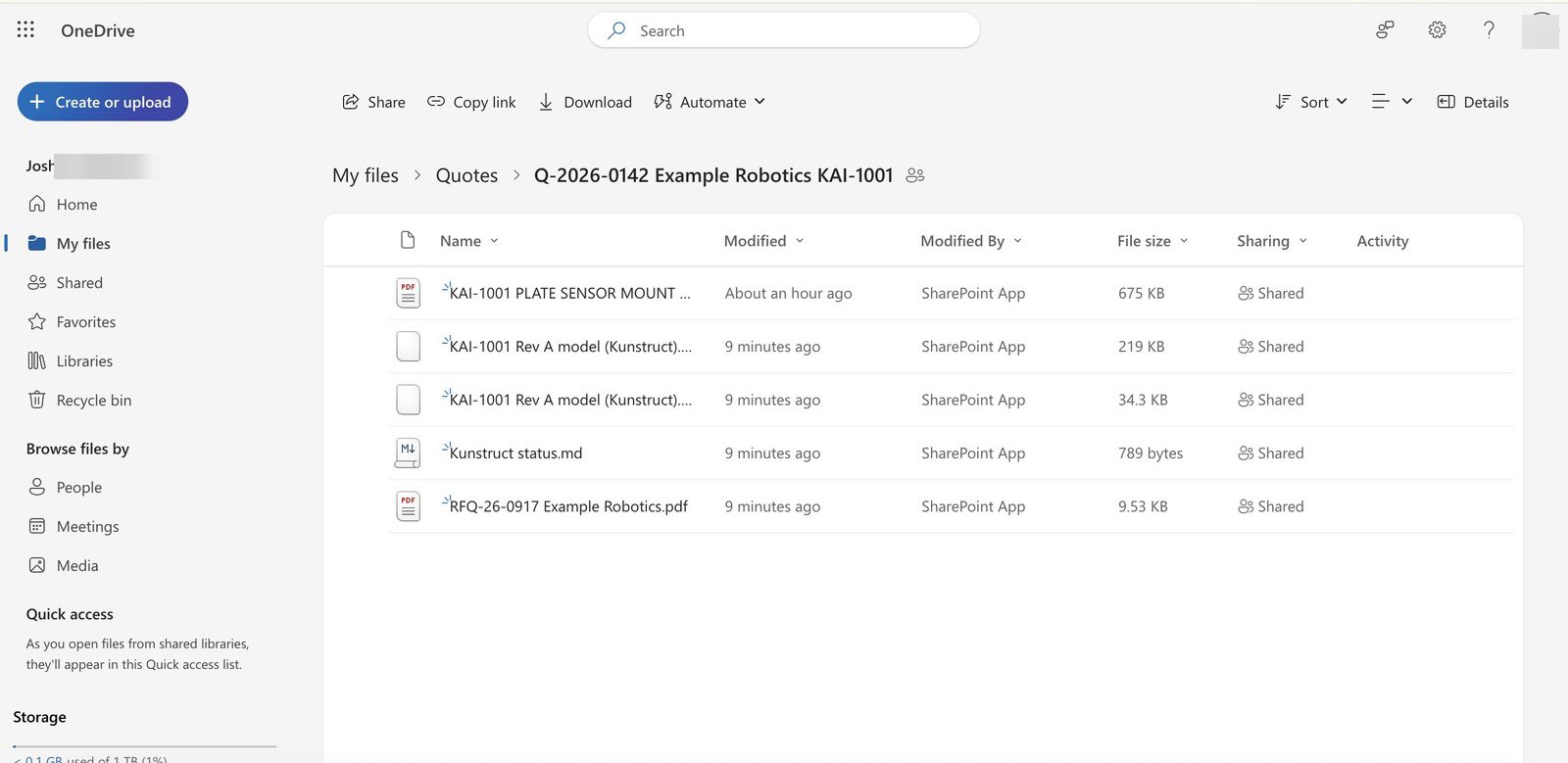
Picks up the quote request wherever it arrives
An email with a drawing and an RFQ sheet, a website form, a customer portal. Kunstruct reads the request, acknowledges the buyer, and opens a quote folder on your drive with everything in it.
Most tools speed up one step. Kunstruct runs the whole loop.
An AI plug-in inside your CAM makes toolpaths faster. A quoting portal gives you a system of record. Neither reads the drawing, asks your people, checks the plant, or waits for a signature. Kunstruct does all of it, where the work already happens.
| AI inside your CAM | A quoting portal | Kunstruct | |
|---|---|---|---|
| Reads the RFQ in your inbox and files the packagePortals need the customer to upload into them. | – | ◐ | ✓ |
| Builds a parametric model from the 2D drawingCAM tools start from a model you already have. | – | – | ✓ |
| Manufacturability with the measured value, the limit and the fixFifteen processes, from milling to tube bending. | ◐ | ◐ | ✓ |
| Toolpaths and cycle time from real CAMFirst pass inside Autodesk Fusion, for a programmer to review. | ✓ | – | ✓ |
| Price from your machines, crib, rates and margins | ◐ | ✓ | ✓ |
| Takes questions to the person who owns the answer, in the chat they already useThey answer when they are free; the quote keeps moving. | – | – | ✓ |
| Capacity checked against your plant forecastFrom your planning data, however you keep it. | – | – | ✓ |
| Sign-off before the quote goes out | – | ◐ | ✓ |
| Your past change orders and first articles on each findingRetrieved from your own records. Nothing is pooled or trained on. | – | – | ✓ |
| Lives in your CAD, your inbox and your driveNo new system for the estimator to live in. | ◐ | – | ✓ |
Send the quote with a second price: the part as drawn, and the part if they take your changes.
Your estimator already knows which features make a part expensive, and which tolerances nobody needed. Kunstruct puts that in the quote itself: the price as drawn, and a cheaper price if the customer accepts the changes, each one costed from your own rates and tooling. The buyer gets a reason to come back to you instead of shopping the drawing around.
KAI-1002 HOUSING, SENSOR, a Kunstruct sample. Real engine, real Fusion, costs from an example shop profile, history from sample records.
Pocket corners at R.030, 1.00 in deep, so the only cutter that fits has to reach 16 times its diameter. Four mounting holes at .300 in, which is not a drill size.
Corners opened to R.170 so a stocked 1/4 in end mill arcs through, holes to 5/16. Re-check comes back clean.
Saves About $1,100 across the lot of 50 at the example shop's rates, and about 40 percent of the cycle time on the corners. No long-reach cutter to buy.
In 2016 this shop broke two cutters on the first article of a sister part and asked the customer to open the same corners from R.030 to R.125. The change order came back approved.
- CNC milling
- CNC turning
- Sheet metal
- Injection molding
- Metal casting
- Polymer 3D printing
- Metal 3D printing
- Welded fabrication
- Closed-die forging
- Aluminum extrusion
- EDM
- Precision grinding
- Fiber composites
- Tube bending
- Metal stamping
Bring us the workflow. We will bring you efficiency and cost savings.
We will set Kunstruct up around it, on your standards and your shop, and measure what it saves.

Kunstruct is founded by Josh Heckman, a mechanical design engineer with aerospace and defense experience at two Fortune 500 companies. Winner of the 2026 Kelley EVC pitch competition.
Josh Heckman · FounderThe platform ships in pieces.
Be first in line.
The drawing checker is live today. Join the waitlist and we will reach out as each new piece goes live: the Fusion add-in, the design assistant, and the quoting and manufacturability tools.

Less time quoting. More time making parts. An AI quoting loop that runs in the CAD, inbox and Teams your shop already uses.
© 2026 Kunstruct AI Inc. All rights reserved.Autodesk Fusion, Microsoft Teams, Microsoft Outlook, OneDrive and all other product names mentioned on this site are trademarks of their respective owners. Kunstruct AI is an independent company and is not affiliated with, endorsed by, or sponsored by any of them. The recordings and screens on this site show Kunstruct running on KAI sample parts for a fictional customer, priced with example shop rates, in a pilot environment.